From domain name to IP address: how a DNS lookup works
What happens between typing a name and getting an IP address: stub and recursive resolvers, authoritative servers, caches, A and AAAA records and TTL, explained from the RFCs.
When you type www.example.com into a browser, there is a problem to solve before any page can load. To connect, the computer needs an IP address, not a name. The system that turns names into addresses is DNS, the Domain Name System, and this post walks through how that lookup happens, using the terms the RFCs use.
The parts involved
Following RFC 9499, which collects DNS terminology, a lookup involves roughly these roles.
- Stub resolver: a resolver that cannot do the whole lookup by itself. It usually lives in the operating system or a library, takes the app’s question and hands it to a recursive resolver.
- Recursive resolver: a resolver that takes a question and asks the servers it needs to, one after another, until it has the final answer. They are run by internet providers, public DNS services, company networks, home routers and others. It normally keeps the answers it receives in a cache and reuses them.
- Authoritative server: a server that knows the contents of a zone itself, so it can answer questions about that zone without asking other servers. This is where the records for
example.comfinally come from. - Cache: a store of answers received earlier, kept for a while. Besides the recursive resolver, the operating system or the app may have one too.
At the top of the name space is the root; below it are top-level domains (TLDs) such as .com, and below those, domains such as example.com. A parent zone delegates a child zone to other servers, and a response that points to those servers is a referral.
The simplified cold-cache path
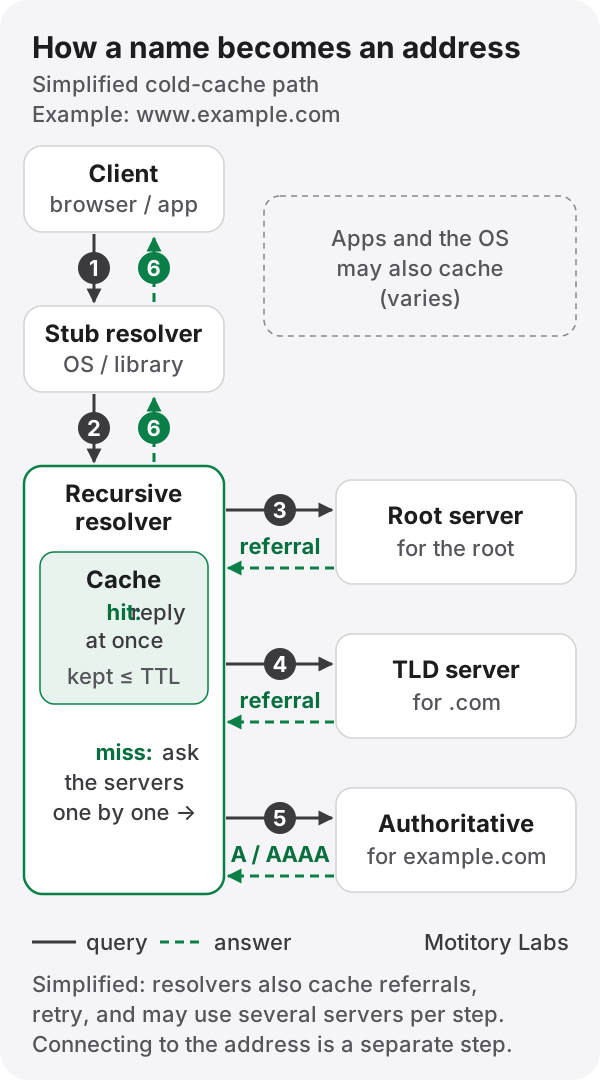
Figure: a simplified path that assumes every cache is empty. In practice the caches in the app, the operating system or the recursive resolver may answer, or already hold part of the way, and then the path is shorter.
Assuming nothing is cached, finding the address of www.example.com can be drawn like this.
- The browser or app asks the stub resolver for the address of
www.example.com. - The stub resolver sends the question to its configured recursive resolver.
- The recursive resolver asks a root server. Instead of an answer, the root server returns a referral: “these servers handle
.com”. - The recursive resolver asks a
.comserver and gets another referral: “these servers handleexample.com”. - The recursive resolver asks an authoritative server for
example.comand gets the A or AAAA records forwww.example.comas the answer. - The recursive resolver caches the answer and returns it to the stub resolver, which passes it to the app.
The client asks the recursive resolver once, “find me the final answer”, and the recursive resolver follows referrals across several servers. RFC 1034 describes these as the recursive and iterative modes, and sets out an algorithm in which the resolver first checks its cache, then asks the closest servers it knows of and follows referrals from there.
Why reality differs from the picture
The six steps above are a model to aid understanding. Real lookups differ for several reasons.
- Caches answer first. If the recursive resolver holds a fresh answer, it replies without steps 3 to 5. A resolver may serve many users, so a name may already be cached from an earlier lookup.
- Intermediate information is cached too. The recursive resolver also keeps referral data, such as the list of servers for
.com, so it does not start from the root every time. - Where caches sit depends on the implementation. Whether the browser keeps its own cache, whether the operating system does, whether an app uses the operating system’s resolver or queries DNS itself, and whether a
hostsfile is checked first all vary by browser, operating system and configuration. - There is no fixed number of round trips. Depending on what is cached, retries to slow servers, the choice among several servers, and extra lookups to follow aliases (CNAME), a lookup can take anywhere from zero to many network round trips. There is no single number for “how many round trips a DNS lookup takes”.
A and AAAA records
The addresses DNS returns come in different record types.
- A record: holds one IPv4 address (32 bits), in a form such as
192.0.2.1. Defined in RFC 1035. - AAAA record: holds one IPv6 address (128 bits), in a form such as
2001:db8::1. Defined in RFC 3596.
A name may have both, or only one. When both come back, which address to try first is decided by the client, not by DNS.
TTL: how long an answer may be cached
Every record carries a TTL (time to live). RFC 1035 defines it as the time interval, in seconds, that a record may be cached before the source of the information should again be consulted. A TTL of zero means the record can be used only for the transaction in progress and should not be cached.
TTL is the longest a record may be kept, not a time it must be kept: a cache can discard a record earlier. Until a cached copy expires, though, a cache may keep answering with it, so right after a record changes some users may still get the old address.
A DNS lookup is not a connection
When the DNS lookup ends, the app only knows an address. To fetch a web page it still has to open a connection to that address (TCP or QUIC), negotiate encryption with TLS for HTTPS, and then send the HTTP request, each a separate step. So when “the site won’t open”, the problem may be DNS failing to find the name, or it may be that the address was found and the connection or the server failed afterwards.
RFCs used
- RFC 9499 — DNS Terminology (2024, BCP 219): definitions of the terms used here, including stub resolver, recursive resolver, authoritative server, cache and referral.
- RFC 1034 — Domain Names: Concepts and Facilities (1987): the concepts of DNS and the resolver algorithm.
- RFC 1035 — Domain Names: Implementation and Specification (1987): the definitions of the A record and the TTL field.
- RFC 3596 — DNS Extensions to Support IP Version 6 (2003): the definition of the AAAA record.
RFC 1034 and 1035 are the foundational DNS documents. Many later RFCs have updated and extended them, so they do not describe everything today’s resolvers and browsers do.