Two dots or three in Git: what A..B and A...B mean in log and diff
Which commits git log selects for A..B and A...B, which two points git diff compares for each, and which one pull request diffs use, from Git's own docs and a reproduced example.
git log main..feature and git log main...feature differ by one dot, and they can select different commits. Put the same notation after git diff and the meaning shifts again, because log reads dotted notation as a set of commits while diff reads it as two endpoints to compare.
So in a forked history like the one below, three dots in log pick up commits from both branches, while git diff main...feature leaves out the change made only on main. That comes from this particular history. There’s no rule that three dots always show more, or always show less; the amount of output depends on the commit graph and the file contents. The examples were run with git 2.55.0 on macOS 15.6.1.
The example repository
A feature branch was created from a base commit, and each side then got one commit:
feature: addsfeature.txtmain: addsmain.txt
In this simple history, base is the best common ancestor of the two branch tips. Git calls it the merge base, and git merge-base main feature prints it.
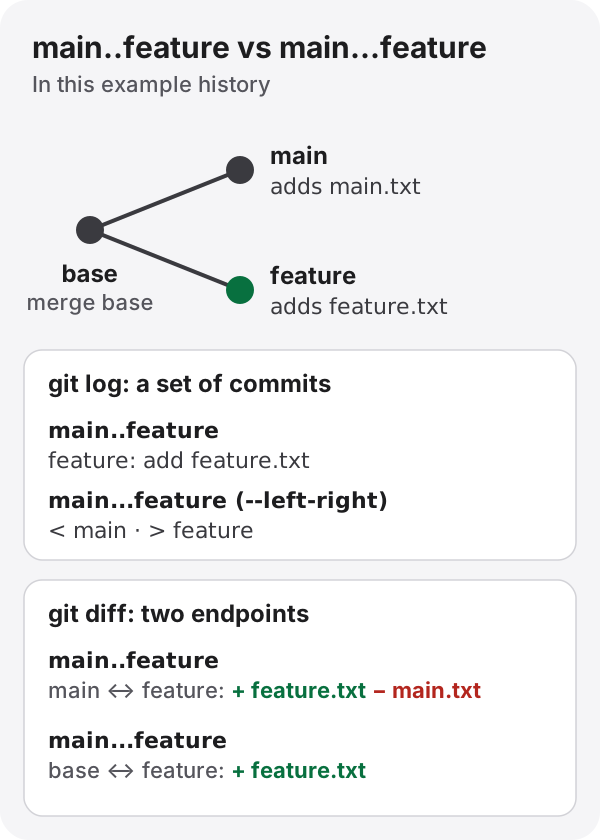
Figure: results for this example history. With a differently shaped history, the difference between the two notations changes too.
In git log: a set of commits
According to gitrevisions, r1..r2 is shorthand for ^r1 r2: the commits reachable from r2, excluding those reachable from r1.
$ git log --format=%s main..feature
feature: add feature.txt
r1...r2 is the symmetric difference: commits reachable from either side but not from both. With --left-right, commits from the left side (r1) are marked < and commits from the right side (r2) are marked >.
$ git log --left-right --format='%m %s' main...feature
< main: add main.txt
> feature: add feature.txt
In both notations you can leave out one end, and it defaults to HEAD. origin.. is the same as origin..HEAD.
In git diff: comparing two points
The git-diff manual says explicitly that diff compares two endpoints, and that .. and ... here are not ranges in the gitrevisions sense.
git diff A..B is the same as git diff A B. It compares the two commits’ snapshots directly.
$ git diff --stat main..feature
 feature.txt | 1 +
 main.txt    | 1 -
 2 files changed, 1 insertion(+), 1 deletion(-)
feature never deleted main.txt, yet it shows up as a deletion. The file was added on main after the branches split, so feature doesn’t have it, and putting the two snapshots side by side makes it look removed.
git diff A...B is equivalent to git diff $(git merge-base A B) B. It shows the changes on B’s side since the point where the branches split.
$ git diff --stat main...feature
 feature.txt | 1 +
 1 file changed, 1 insertion(+)
GitHub’s documentation says pull requests show this three-dot diff (checked October 3, 2026). If your question is “what did this branch change?”, three dots is usually what you want.
Summary
| Notation | git log | git diff |
|---|---|---|
A..B |
Commits reachable from B but not from A | Compares the A and B snapshots directly |
A...B |
Commits reachable from only one of A and B | Changes from the merge base to B |
Depending on the shape of the history, the two notations can give the same result. If main is an ancestor of feature, for example because feature was created from main and main hasn’t moved since, then main..feature and main...feature select the same commits in log, and in diff both compare the same two snapshots.
When there is more than one merge base
When branches have been merged into each other (a criss-cross merge), two commits can have more than one best common ancestor. git diff A...B uses the single merge base that git merge-base A B returns without --all. The git-merge-base manual leaves unspecified which one you get when there are several.
git merge-base --all A B shows whether there are several, but it doesn’t change which base the three-dot diff uses.
For reading the @@ lines in diff output, see Reading a unified diff.
Specifications and documentation used
- gitrevisions: specifying revisions and ranges
- git-diff
- git-log:
--left-right - git-merge-base
- GitHub Docs: Branches and pull request comparisons
Links and content were checked on October 3, 2026. GitHub’s interface behavior can change.