Why pale gray text fails: working out WCAG color contrast
Why pale gray text on white fails accessibility checks: the WCAG 2 luminance and contrast formulas, the 4.5:1, 3:1 and 7:1 thresholds, and dark mode, with real hex values.
The mockup looked clean. The form’s hint text was a soft #aaaaaa on white, quiet enough not to compete with anything. Then someone opened it on a phone on a sunny train platform and couldn’t read a word of it.
An accessibility checker reduces that experience to one number: 2.32:1. Once you know where the number comes from, you can stop picking grays by eye.
Luminance, not color
WCAG 2 compares the relative luminance of two colors: how bright each one looks, on a scale from 0 for black to 1 for white. It takes two steps.
First, divide each sRGB channel (0–255) by 255 and undo the gamma curve screens use, to get a linear value:
c = value / 255
if c ≤ 0.04045:  c / 12.92
else:            ((c + 0.055) / 1.055) ^ 2.4
Then weight the three channels and add them:
L = 0.2126 × R + 0.7152 × G + 0.0722 × BGreen counts about ten times as much as blue, because our eyes are far more sensitive to green light. That’s why white text reads fine on pure blue #0000ff despite how saturated it is, and why white on yellow #ffff00 all but disappears.
(Older copies of WCAG give the threshold as 0.03928. For 8-bit colors no channel value falls between the two numbers, so both give the same results.)
The ratio
With both luminances in hand:
contrast = (L of the lighter + 0.05) / (L of the darker + 0.05)The 0.05 stands in for ambient light reflecting off the screen. It also keeps the ratio finite when one color is black. Results run from 1:1 (identical colors) to 21:1 (black on white).
Here is this site’s own green accent worked through. #0a7f47 is R 10, G 127, B 71. Linearized, that’s roughly 0.003, 0.212 and 0.063; weighted and summed, L ≈ 0.157. White has L = 1, so the contrast is (1 + 0.05) / (0.157 + 0.05) ≈ 5.07:1, above the 4.5:1 needed for body text.
A brighter green, #0e9e58, comes out at only 3.47:1. It looks strong enough, but it would fail as a link color on white, which is why this site’s links use the darker #0a7f47.
Different thresholds for different jobs
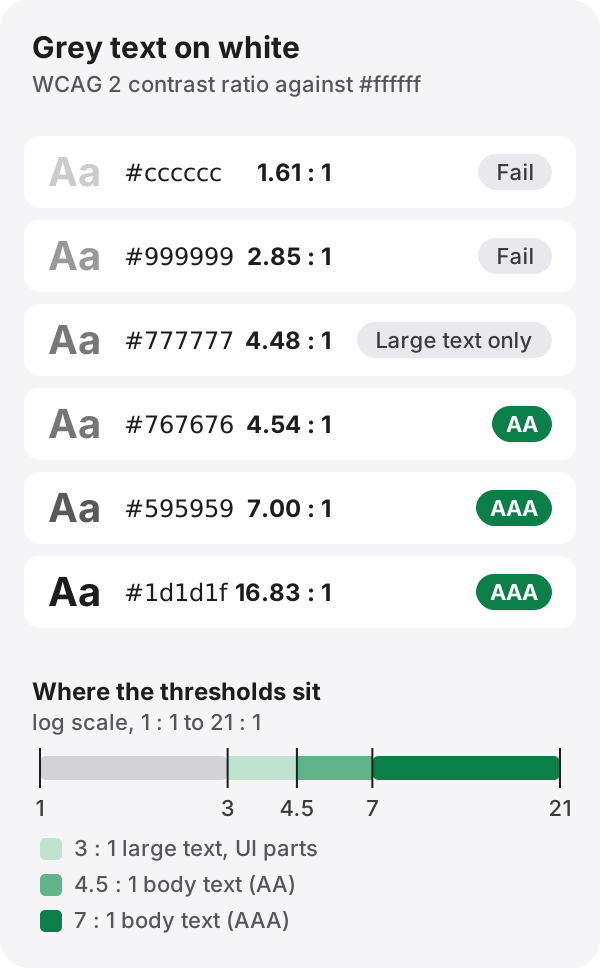
| What | AA | AAA | WCAG criterion |
|---|---|---|---|
| Body text | 4.5:1 | 7:1 | 1.4.3, 1.4.6 |
| Large text (24 px and up, or about 18.66 px bold) | 3:1 | 4.5:1 | 1.4.3, 1.4.6 |
| UI parts: input borders, icons, focus indicators | 3:1 | — | 1.4.11 |
Large text gets a lower bar because thicker, bigger strokes stay legible at lower contrast. The specification states the sizes in points, 18 pt or 14 pt bold, which is where the 24 px and 18.66 px figures come from.
One boundary is worth remembering. The lightest gray that reaches 4.5:1 on white is #767676, at 4.54:1. One step lighter, #777777, falls to 4.48:1. If your design system has a “secondary text” gray, that’s the limit.
Some things are exempt: text on disabled controls, pure decoration, and logotypes. Placeholder text isn’t exempt. People have to read it, which is exactly why the pale hint text at the top of this post is a problem.
Contrast isn’t the only cue
Red and green are opposite hues, yet their luminance can be close: #ff0000 against #00ff00 is only 2.91:1. To someone with red–green color blindness, the two can look like the same murky shade.
That’s why WCAG 1.4.1 asks you not to carry information by color alone. Don’t mark a form error with nothing but a red border; add an icon or a line of text. Don’t rely on color to tell chart lines apart; vary the line style or label them. The color blindness simulator shows how your palette looks to people with each type.
Dark mode needs its own numbers
A color that passes on white doesn’t automatically pass on black. The same #0a7f47 drops to 4.14:1 on a black background, so in dark mode this site switches to #1ed47c, which is 10.76:1 against black.
The opposite mistake is common too. Pure white on pure black is the maximum 21:1, but plenty of readers find long passages of it glaring. Many design systems use a slightly gray white on a very dark gray instead. That still lands around 15:1, well clear of every threshold.
The next formula is still a draft
The WCAG 2 formula is simple, but it’s been criticized for rating some dark-on-dark pairs as more readable than they really are. APCA, a newer method, is being discussed for the draft WCAG 3, but that is still a Working Draft. Laws, procurement rules and audits still point to WCAG 2.x, so if you experiment with APCA, keep passing WCAG 2 as well.
Check a color as you pick it
Paste a color into the color converter in HEX, RGB or HSL and it shows the contrast against white and black text, with AA and AAA results. Try #777777 and then #767676 to watch one step flip the result.
References
- W3C, Web Content Accessibility Guidelines (WCAG) 2.2: 1.4.1 Use of Color, 1.4.3 Contrast (Minimum), 1.4.6 Contrast (Enhanced), 1.4.11 Non-text Contrast; definitions of “contrast ratio” and “relative luminance”
- W3C, Understanding Success Criterion 1.4.3: Contrast (Minimum)
- W3C, WCAG 3.0 Working Draft