Why URLs fill up with %C3%A9: percent-encoding explained
Why non-English characters in a link turn into %C3%A9 or %E3%81%82, how encodeURI, encodeURIComponent and URLSearchParams differ, %20 versus +, and the double-encoding bug behind %2520.
Search for a dessert, copy the link, and paste it into a chat:
https://www.google.com/search?q=cr%C3%A8me+br%C3%BBl%C3%A9eThe address bar said crème brûlée. The pasted link says something else, and it still works: open it and you get the same results. What you are looking at is percent-encoding, usually called URL encoding. For Japanese or Korean text it gets much longer: a search for 検索 carries %E6%A4%9C%E7%B4%A2.
%C3 is a byte, not a character
URLs are only allowed a small set of characters: ASCII letters, digits and a handful of symbols (RFC 3986). Anything else is first converted to UTF-8 bytes, and each byte is written as % followed by two hex digits.
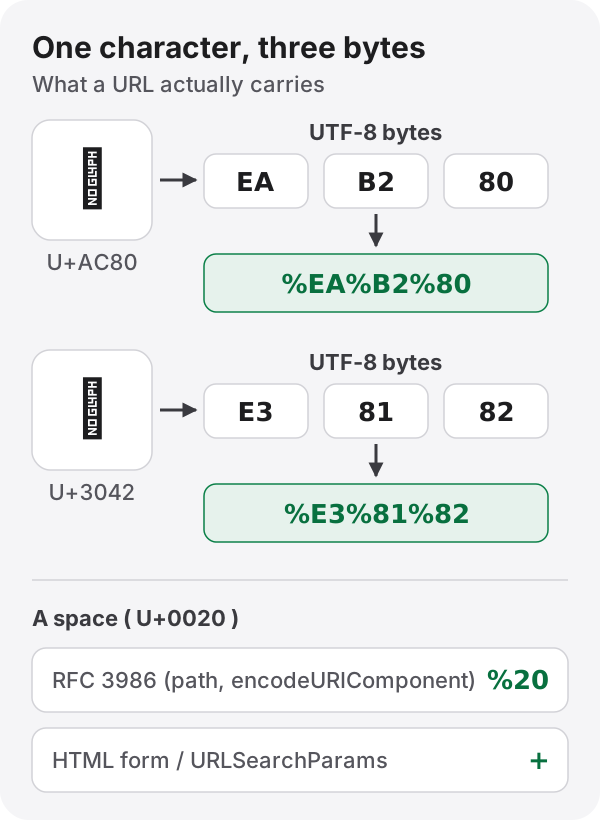
An accented Latin letter such as é is two bytes (C3 A9), so it becomes %C3%A9. Most Japanese, Chinese and Korean characters are three bytes, and an emoji is four: 😀 is %F0%9F%98%80. None of those %XX groups means anything alone. The character only exists once all its bytes are together.
That is also why a truncated link can break a page. Cut an encoded address in the middle of a character and decodeURIComponent('%E3%81') throws URIError: URI malformed.
Characters that stay, characters that change
RFC 3986 sorts URL characters into two groups.
| Group | Characters | Rule |
|---|---|---|
| Unreserved | A–Z a–z 0–9 - . _ ~ |
Never encoded |
| Reserved | : / ? # [ ] @ ! $ & ' ( ) * + , ; = |
Left alone as delimiters, encoded inside a value |
Reserved characters are the URL’s skeleton: ? starts the query, & separates parameters, = separates a name from its value. If a search term itself contains &, as in salt & pepper, it must become %26, or the server will think the parameter ended there.
Three functions, three answers
JavaScript has more than one way to encode, and each leaves a slightly different set of characters alone. The same input shows the difference.
| Method | Leaves alone | a b&c becomes |
|---|---|---|
encodeURI() |
Unreserved, plus ; , / ? : @ & = + $ # and ! * ' ( ) |
a%20b&c |
encodeURIComponent() |
Unreserved, plus ! * ' ( ) |
a%20b%26c |
URLSearchParams |
Letters, digits and * - . _ |
a+b%26c |
encodeURI() assumes it has been given a whole URL. It mustn’t break the delimiters, so it keeps /, ? and &, which also means it keeps an & inside a value. Encode a single search term with it and you get exactly the bug above.
encodeURIComponent() is for one piece of a URL: a query value or a path segment. Most of the time it is the one you want. One caveat: it leaves ! * ' ( ) unencoded even though RFC 3986 lists them as reserved. If you are sending to something that treats them specially (some request-signing schemes do), encode them yourself.
URLSearchParams follows the format HTML forms use (application/x-www-form-urlencoded). When building a query string it is safer than gluing strings together by hand.
const params = new URLSearchParams({ q: "crème brûlée", page: "2" });
`/search?${params}`; // "/search?q=cr%C3%A8me+br%C3%BBl%C3%A9e&page=2"
A space can be %20 or +
Notice the + in that output. In RFC 3986 percent-encoding a space is %20; in HTML form encoding it is +. Both are standard. They just belong to different places.
The trouble starts when the two meet. Reading + as a space is a form-encoding rule, so decodeURIComponent('a+b') returns a+b unchanged, while new URLSearchParams('q=a+b').get('q') returns a b. Put a phone number like +1 555… or a sum like 1+1 in a query and the + may vanish, depending on which rule the receiving side applies. If a value can contain +, encode it as %2B before it leaves.
Even one browser gives both answers: new URL('https://example.com/?q=a b').href writes the space as %20, URLSearchParams writes +.
%2520 means it was encoded twice
A log line with %2520 or %25C3 in it almost always means an already-encoded string was encoded again, because the encoding of % itself is %25.
"a b" → "a%20b" → "a%2520b"The usual path: the front end builds a value with encodeURIComponent, then passes it to URLSearchParams or an HTTP client’s params option, which sees raw text and encodes it again. Decide that encoding happens once, at the one place where the URL is assembled, and this bug goes away.
The address bar decodes for you
So why did the address bar show crème brûlée in the first place? Most browsers decode percent-encoding in the address bar so it is readable, while the request they send, and the link you copy, use the encoded form. What you see and what travels are not the same string.
Domain names are a separate case. A host like bücher.example isn’t percent-encoded at all; it becomes Punycode, starting with xn--. Percent-encoding covers the path and the query.
Paste one in and look
Paste a copied link into the URL encoder and decoder and it shows the readable text and splits the query into a table of parameters. When encoding you choose between a single value (encodeURIComponent) and a whole URL (encodeURI); when decoding you choose whether + means a space. Try a b&c both ways to see the table above for yourself.
References
- RFC 3986, Uniform Resource Identifier (URI): Generic Syntax
- WHATWG, URL Standard (application/x-www-form-urlencoded)
- ECMAScript specification (ECMA-262),
encodeURIandencodeURIComponent