Why bücher.example turns into xn--bcher-kva: IDNs and Punycode
Why a domain with accents or non-Latin script shows up as xn--… in DNS settings and certificates, how Punycode spells it in ASCII, the mapping rules before it, and homograph phishing.
A bookshop in Berlin registers bücher.example. The browser shows the ü just fine, but the DNS dashboard wants xn--bcher-kva.example, and the TLS certificate lists the same odd string. It isn’t a typo or a different domain. The version with the ü is for people; the one starting with xn-- is what the network actually carries.
Host names were ASCII from the start
The original rules for host names allow letters, digits and hyphens, often called the LDH rule. DNS servers, mail servers, firewalls and decades of software assume it. Changing all of that at once wasn’t possible, so the fix went the other way: a standard way to spell any name in ASCII. That set of rules is IDNA (Internationalized Domain Names in Applications), currently RFC 5890–5893, known as IDNA2008.
IDNA names the two forms:
| Form | Example | Where it’s used |
|---|---|---|
| U-label | bücher |
What people read and type |
| A-label | xn--bcher-kva |
What DNS, certificates and HTTP requests carry |
xn-- is the ACE prefix: a marker that says “this label has been converted”. Conversion happens per label, between the dots, and labels that are already ASCII, like example, are left alone.
Punycode: keep the ASCII, then say where the rest goes
The algorithm that produces the A-label is Punycode (RFC 3492). bücher shows how it works.
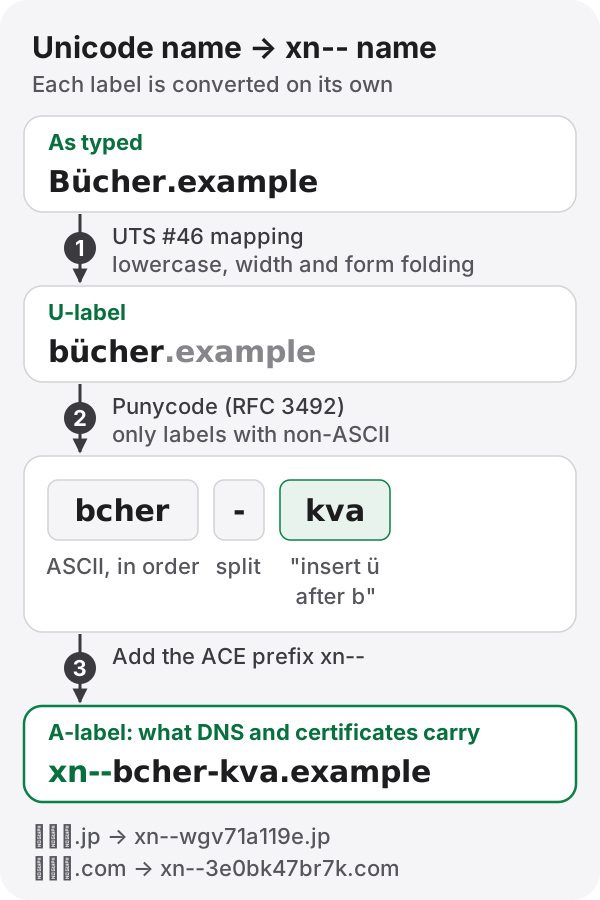
- Copy out the ASCII characters, in order:
bcher. - If there were any, add a hyphen.
- Encode each missing character (
ü, U+00FC) together with the position where it goes as a number, and write that number with letters and digits:kva.
So bücher becomes bcher-kva, and with the prefix, xn--bcher-kva. A label with no ASCII at all, like the Japanese 日本語, has nothing to copy in step 1, so there’s no hyphen: it becomes xn--wgv71a119e. The numbers are differences between code points, written in a variable-length form. Characters close together in Unicode make short output; widely scattered ones make it longer.
Tidied before it’s converted
Before Punycode runs, the browser normalizes what you typed, following Unicode Technical Standard #46:
- Capitals become lowercase, so
Bücherandbücherare the same domain. - Full-width letters such as
ABCbecomeabc, and the ideographic full stop。counts as a dot. - Compatibility characters fold to their plain form: the old long s,
ſ, becomess.
Not everything folds. The German ß used to become ss under the older rules (IDNA2003); today’s browsers keep it, sending faß.de as xn--fa-hia.de. For a while, the same typed name could lead to two different places depending on the software.
The length limit applies to the A-label
A DNS label can be at most 63 bytes (RFC 1035), and that limit counts the converted label, not the characters you see. A name that looks short in Korean or Japanese can hit it sooner than you’d expect: in a quick test with distinct Hangul syllables, about 20 of them already filled the 63. Check with a real conversion rather than counting characters.
Where you run into xn–
- DNS dashboards: many providers want the A-label when you add records.
- Certificates: the domain names in a TLS certificate (the SAN field) are stored as A-labels. Open a certificate’s details and you’ll see
xn--. - HTTP and logs: browsers send the A-label in the
Hostheader, so server logs and analytics show it too. - Email: if the receiving server doesn’t support internationalized mail (SMTPUTF8, RFC 6531), the domain part of an address is sent as an A-label. A non-ASCII part before the
@has no such fallback; it only gets through if the other side supports it.
Same shape, different letters: homograph attacks
There is a catch. Cyrillic а (U+0430) looks exactly like Latin a, so аpple.com is indistinguishable from the real thing by eye, but its A-label is xn--pple-43d.com, an entirely different domain.
That’s why browsers don’t always show the Unicode form. Chrome and Firefox fall back to displaying xn-- when a label mixes scripts in suspicious ways or looks confusably like a well-known domain, using rules based on UTS #39 (Unicode Security Mechanisms). Combinations that real languages use, such as Latin with accents, or Japanese kanji with kana, are allowed, so an honest bücher.example still shows its ü. If the address bar shows an xn-- name you didn’t expect, be suspicious.
Converting between the two
To check what to put in a DNS record or certificate, or to find out which domain an xn-- in your logs belongs to, use the Punycode converter. Enter a Unicode domain to get the A-label, or an xn-- name to get the original; paste a whole URL and it picks out the host name. It all runs in your browser.
References
- RFC 3492, Punycode: A Bootstring encoding of Unicode for IDNA
- RFC 5890–5893, Internationalized Domain Names for Applications (IDNA)
- Unicode Technical Standard #46, Unicode IDNA Compatibility Processing
- Unicode Technical Standard #39, Unicode Security Mechanisms
- RFC 1035, Domain Names – Implementation and Specification
- RFC 6531, SMTP Extension for Internationalized Email