What a hash function does: SHA-256, checksums and password storage
Why SHA-256 is always 64 hex digits, why one changed letter changes everything, how hashing differs from encryption and encoding, checking downloads, and why fast hashes are wrong for passwords.
Next to the download button for a Linux ISO or a developer tool there’s usually a line like SHA256: 3f7a…. Most people scroll past it. That one line lets you confirm that a multi-gigabyte download arrived without a single bit out of place. It comes from a hash function.
Any input, one fixed length
A hash function takes data of any size and returns a value of fixed length. SHA-256, as the name says, returns 256 bits: 64 digits in hexadecimal. Five letters or a 10 GB video, the output is the same size.
SHA-256("hello") = 2cf24dba5fb0a30e26e83b2ac5b9e29e1b161e5c1fa7425e73043362938b9824
SHA-256("")      = e3b0c44298fc1c149afbf4c8996fb92427ae41e4649b934ca495991b7852b855
Even the empty string has a hash. The function works on bytes, not characters. The same word saved as UTF-8 and as Latin-1 gives different hashes, and so does the same file with LF and with CRLF line endings.
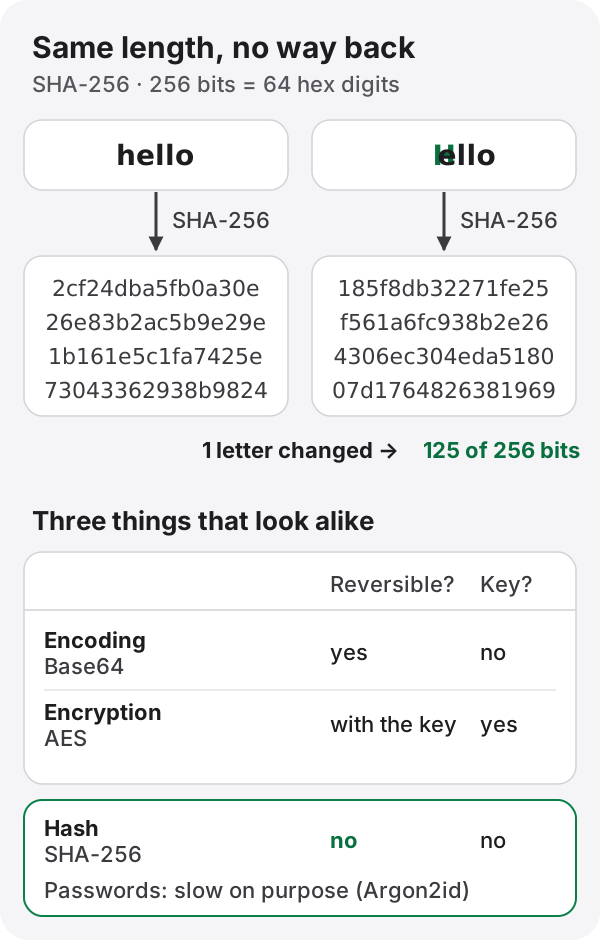
Capitalize the h in hello and the output changes completely. Compare the two results bit by bit and 125 of the 256 bits differ. A tiny change to the input flips about half the output. This is the avalanche effect, and it means you can’t even tell from two hashes whether their inputs were similar.
What a cryptographic hash promises
A cryptographic hash such as SHA-256 is expected to have three properties:
- Preimage resistance: given a hash, you can’t find an input that produces it.
- Second-preimage resistance: given an input, you can’t find a different one with the same hash.
- Collision resistance: you can’t find any two different inputs with the same hash.
With the output fixed at 256 bits, collisions must exist; there are far more possible inputs than outputs. What matters is that nobody can find one with any realistic amount of computation.
How MD5 and SHA-1 fell
MD5 was retired from security use after Wang Xiaoyun’s team showed in 2004 how to construct collisions. In 2012 the Flame malware used an MD5 collision to forge a Microsoft code-signing certificate.
SHA-1 went in February 2017, when Google and CWI Amsterdam published two different PDF files with the same SHA-1 hash (SHAttered). It took about 2⁶³ SHA-1 computations: beyond an individual, but within reach of a well-funded organization.
That doesn’t make MD5 and SHA-1 useless. For spotting a file that got corrupted by accident, they still work. The problem is deliberate tampering. Anywhere an attacker could interfere (signatures, certificates, passwords), use SHA-256 or stronger.
Hashing, encryption and encoding are different things
All three turn data into an unreadable string, so people mix them up. They do different jobs.
| Can it be reversed? | Needs a key? | Used for | |
|---|---|---|---|
| Encoding (Base64…) | By anyone | No | Writing data as text |
| Encryption (AES…) | With the key | Yes | Keeping data secret |
| Hashing (SHA-256…) | No | No | Integrity checks, password verification |
You’ll often hear that a service “encrypts your password”. A well-built one doesn’t: it hashes it. Encryption can be undone with the key, so a leaked key would expose every password at once.
Checking a download
Every operating system can compute a checksum without extra software:
# Windows (PowerShell)
Get-FileHash .\ubuntu.iso -Algorithm SHA256

# macOS
shasum -a 256 ubuntu.iso

# Linux
sha256sum ubuntu.iso
If the output differs from the published value by even one character, the file is damaged or has been altered. One limit is worth knowing. If the file and its checksum come from the same server, an attacker who controls that server can change both. That’s why major distributions also sign their checksum files with GPG.
Why SHA-256 is the wrong tool for passwords
Hashes can’t be reversed, so storing passwords as SHA-256 sounds safe. It isn’t, because SHA-256 is fast. That’s a virtue when checking files, and just as much a virtue for an attacker who has copied your user table. A single GPU can hash billions of guesses per second, and common passwords fall almost immediately.
Password storage adds two things.
The first is a salt: a random value, different for each user, mixed in before hashing. Two people with the same password get different stored values, and precomputed tables of hashes (rainbow tables) stop working.
The second is a hash that is slow on purpose. The OWASP Password Storage Cheat Sheet recommends:
| Algorithm | OWASP minimum settings |
|---|---|
| Argon2id (first choice) | 19 MiB memory, 2 iterations, parallelism 1 |
| scrypt | N=2¹⁷, r=8, p=1 |
| bcrypt | work factor 10 or more (only the first 72 bytes are used) |
| PBKDF2-HMAC-SHA256 | 600,000 iterations or more (when FIPS compliance is required) |
A tenth of a second per check goes unnoticed by someone logging in, but it is crippling for someone testing billions of candidates. These algorithms generate the salt themselves and store it inside the output string, so there’s nothing extra to manage. Use your language’s well-tested library; don’t write your own.
Try it
The hash generator shows MD5, SHA-1, SHA-256, SHA-384 and SHA-512 for any text or file at once, and the last box tells you which one matches a checksum you paste in. Files are hashed in your browser and never uploaded. Enter hello and then Hello to get the results in the diagram above.
References
- NIST FIPS 180-4, Secure Hash Standard (SHS)
- OWASP, Password Storage Cheat Sheet
- Stevens et al., “The first collision for full SHA-1” (SHAttered, 2017)
- Wang, Yu, “How to Break MD5 and Other Hash Functions” (EUROCRYPT 2005)