Getting started with REA safely: a first exercise, a team checklist and a 30/60/90-day path
What to know first, a low-risk first investigation on the official Notes fixture, a checklist for teams, proposed success gates and a 30/60/90-day pilot with conditions for stopping.
The first three parts of this series looked at what others tested, what the docs say is possible and what the design trades away. This last part is practical: how do you try REA without putting anything you care about at risk, and how would a team know whether it is worth keeping?
It follows the overview, which already has a general learning route and a “write your own program” exercise. This post is narrower: one exercise built around the official fixture, and a pilot plan.
- What recent write-ups actually tested
- Capabilities and limits
- Strengths, trade-offs and where it might go
- Getting started safely (this post)
Observation date: 14 October 2026. Commands and flags mentioned here are as described in the official docs for 6.4.0 on that date, not a timeless recipe; always follow the official get-started page for the version you install. Motitory has not run REA, so the steps below are not a report of our own run. The checklist, the success gates and the 30/60/90-day plan are Motitory proposals, not REA requirements or industry standards.
Before anything: permission and data
Two rules apply to every step below.
- Only analyse what you own or are explicitly authorised to analyse. REA’s MIT licence covers REA’s code. It gives you no rights to a target, and third-party tools such as Ghidra, JADX or Frida come with their own licences (third-party tools). Being downloadable is not permission. This post is not legal advice; if you are unsure, do not analyse it.
- “Local” still sends results to a model. REA runs tools on your machine, but if an agent is connected, the tool output goes to its model provider. And runtime paths such as a browser, a proxy, a device or Frida can change state (local effects). The first exercise avoids both runtime paths and sensitive targets for that reason.
What to know first
The overview has a full learning route. For this exercise and a pilot, this is the minimum.
| Level | Know this | Why it matters here |
|---|---|---|
| Beginner | What you are authorised to analyse, and what is out of scope | Everything else depends on it |
| Beginner | Using a shell: absolute paths, reading JSON output | Setup and Evidence are JSON |
| Beginner | Basic JavaScript: modules, imports, event handlers | The first target is an Electron app |
| Beginner | Telling an observation from an inference from an unknown | The main skill in reading Evidence |
| Intermediate | C, pointers and memory; calling conventions; executable formats | Before any native target |
| Intermediate | What decompilers get wrong | Pseudocode is not source |
| Intermediate | Isolating with VMs, separate accounts and network rules | Before any runtime path |
| Intermediate | What CDP and network capture can see | Browser and proxy paths record sensitive data |
| Intermediate | The threat model of local MCP servers | REA is not a sandbox (security boundary) |
| Intermediate | Supply chain and third-party licences | You install and license the providers |
A first exercise with the lowest risk we can think of
The target is the project’s own Notes example: the first investigation guide and notes-example.zip. It is small, public and meant to be analysed. If you prefer, use a program you wrote yourself instead. Use nothing else for this exercise.
1. Pick a version and keep it. Choose a released version you have reviewed, for example 6.4.0 as of this writing, and read its release notes. Remember that main and the npm release differ (release vs main); do not mix them in one exercise.
2. Choose how conservative to be.
- Most conservative: use the CLI for static analysis only, without connecting an agent. Nothing goes to a model provider unless you paste it there.
- With an agent: the 6.4.0 docs describe running
setupwith--client <your client> --dry-run --jsonfirst. Read what it would change, approve it yourself, then run the real setup scoped to that one client, and check the result withdoctor --client <your client> --json. Take the exact command from the get-started page, not from here.
3. Keep the original untouched. Download the ZIP from the official site, record its SHA-256 hash, and keep a read-only copy. Work on a copy in a folder you can delete.
4. Ask one narrow question, statically. For example: “When a user chooses Export notes, which functions does the data pass through on its way to the CSV, and how does the formatter handle commas, double quotes and line breaks inside a note?” Allow static analysis only. Do not run the app through REA.
5. Sort the answer into three columns. What the Evidence shows (with file and location), what the agent inferred, and what is listed as unknown. If the answer has no unknowns at all, look again: one independent run on this same fixture still found 44 in the whole-project graph (part 1).
6. Test one prediction independently. Take one concrete prediction, say what the CSV line for a note titled He said "hi", then left should look like, and check it yourself, outside the agent: read the formatter in the fixture’s source, or, if it is a plain function, call it from a short test in your disposable folder. Compare it with how RFC 4180 handles quotes and commas. If the prediction holds, you have one claim with two kinds of evidence. If it does not, you have learned more.
7. Write it down. The version, the ZIP hash, the question, the time spent including your review, and which claims you checked. That record is what makes the exercise repeatable and comparable later.
A checklist for teams
If a team wants to go further, these are the questions to answer before the first real target. Each group can be one page in an internal doc.
- Permission. Written approval from the owner for each target, and a clear statement of which operations are allowed: static only, or specific runtime paths.
- Environment. A disposable, unprivileged environment with no secrets, cookies or customer data. Originals hashed and kept read-only.
- Supply chain. Install only from official sources. Pin version, digest and lockfile. Review the dry-run output. Limit setup to one client. Update in a separate, planned window.
- Connection and control. stdio or loopback only. Show the exact command for each call. Limit filesystem and network egress, filter which tools the agent can see, and require approval per call for anything marked destructive or device-changing. Remember that REA’s annotations are hints; your client enforces approval.
- Data. Classify what the target contains. Check the model provider’s data policy. Redact where you can. Decide retention, access and deletion for Evidence.
- Method. Ask narrow questions. Go static first, form a hypothesis, then run an approved dynamic step only if needed. Keep facts, inferences and unknowns apart. Require two kinds of evidence for any important conclusion.
- Operations. A rollback plan. Cleanup of provider projects and captures. A monthly or per-release compatibility check of OS, providers and REA version. A path for reporting incidents.
How to tell whether it works: proposed gates
These are gates we would propose for a pilot, not universal standards. Set your own numbers, but set them before you start.
| What to measure | Proposed gate |
|---|---|
| Important claims backed by direct evidence | 100% |
| Claim precision (claims that hold up when checked) | 95% or more |
| False certainty (stated as fact, actually unknown or wrong) | 2% or less overall, 0 for high-risk claims |
| Reproducibility (same version and input, same important conclusions) | 95% or more |
| Median time saved, review time included | 30% or more |
| Unauthorised access, unintended external transmission, secret exposure | 0 |
| Human sign-off on product or security conclusions | 100% |
The time-saving gate matters most and is the easiest to fudge. Count the hours someone spent reading Evidence, not just how fast the run finished.
A 30/60/90-day path
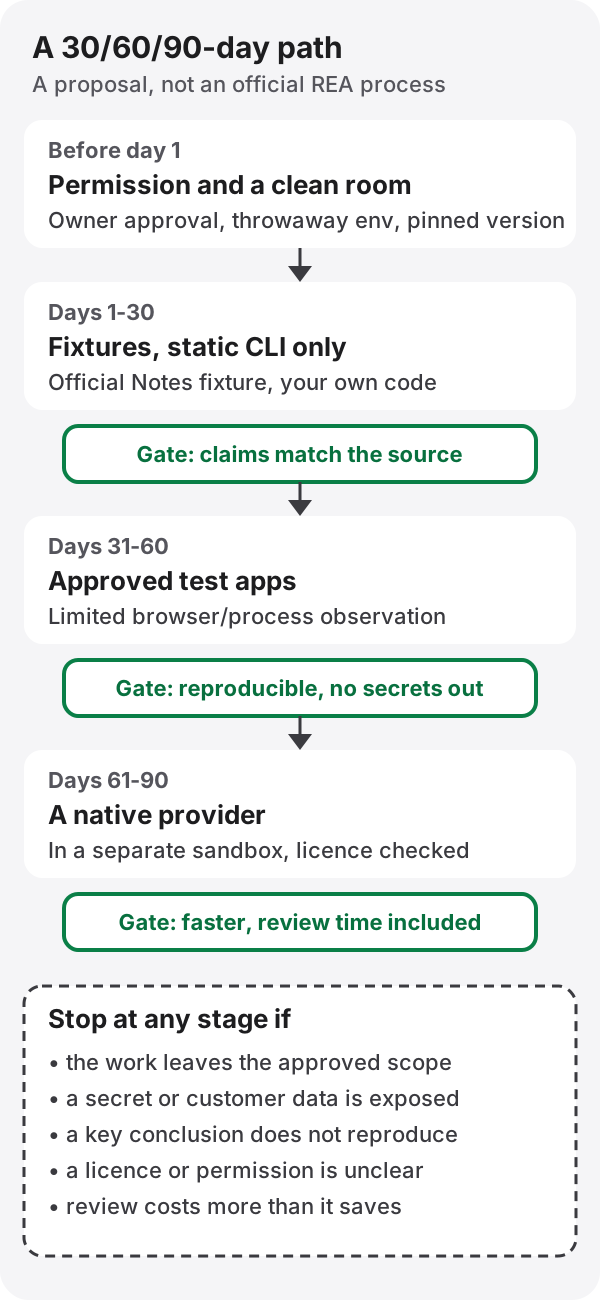
- Days 1–30: fixtures, static CLI. The official fixture and internal fixtures you wrote, with known answers. The goal is calibration: how often is the agent right, and how often does it admit not knowing?
- Days 31–60: approved test apps, limited observation. Your own test builds, in a disposable environment, with a small, approved amount of browser or process observation. The goal is to see what runtime evidence adds and what it costs in setup and review.
- Days 61–90: a native provider in its own sandbox. Add Ghidra or another provider, licence checked, in a separate sandbox. The goal is to see whether the native path is worth its overhead for your targets.
Stop at any stage if work leaves the approved scope, a secret is exposed, an important conclusion cannot be reproduced, a licence is unclear, or review costs more than the time saved. Stopping is a result, not a failure of the pilot.
Closing the series
Across four posts the picture is consistent. REA’s strongest idea is a result that tells you what it did not see. Its public track record is two independent runs, both on JavaScript. Its limits come from providers, platforms, permissions and the gap between static reading and runtime truth. The safest way in is small, owned, static and written down. If you run something careful and publish the Evidence, you will add more to what anyone knows about REA than this series could.
References
- Official start: get started, first investigation, Notes example ZIP
- REA at commit
29d3dcb: release vs main, local effects, untrusted target content, security boundary, responsible use, third-party tools - Release: rea-agents-6.4.0
- Ecosystem: MCP security best practices, OpenAI Agents SDK: MCP approvals and filtering
- In this blog: REA overview, CSV and RFC 4180
Links and content checked on 14 October 2026.