Length beats symbols: measuring password strength in bits
Why a password that passes every uppercase-digit-symbol rule can still be weak, how to measure strength as entropy, passphrases, what NIST now recommends, and why a second factor matters more.
The sign-up form wants “at least 8 characters, with an uppercase letter, a number and a symbol.” After a couple of rejections you type Password1! and get a green tick. Every rule satisfied. It is also among the first passwords an attacker will try.
Passing the rules isn’t the same as being strong
Composition rules assume people will spread different kinds of characters evenly through a password. People don’t. The capital goes first, the digit goes last, and the symbol is an ! stuck on the end. Swapping a for @ and o for 0 is the first thing cracking tools try. The rules make a password look complicated without making it harder to guess.
So the useful measure isn’t what a password contains. It’s how many guesses it takes.
Counting strength in bits
For a password generated at random, the number of possibilities is easy to work out. With N possible characters and length L, there are N^L combinations. Expressed as a power of two, log₂(N^L) = L × log₂N, that number is the password’s entropy, counted in bits.
- 8 lowercase letters (26 options): 8 × log₂26 ≈ 37.6 bits
- 8 characters from upper, lower, digits and 25 symbols (87 options): 8 × log₂87 ≈ 51.5 bits
Every extra bit doubles the number of guesses. The 14 bits between those two is a factor of about 16,000.
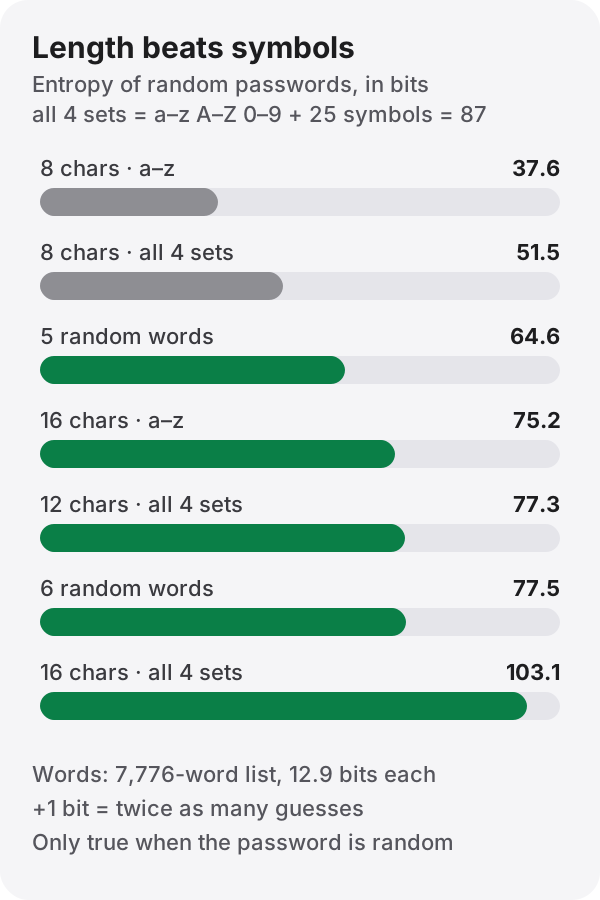
The bar to look at: 16 lowercase letters (75.2 bits) are far stronger than 8 characters of everything (51.5 bits). Tripling the character set from 26 to 87 adds only about 1.7 bits per character. Each extra character adds 4.7 to 6.4 bits.
In time: suppose an attacker has a stolen hash and can test 10 billion guesses a second offline. Trying every combination takes:
| Password | Entropy | To try them all |
|---|---|---|
| 8 lowercase | 37.6 bits | about 21 seconds |
| 8 from 87 | 51.5 bits | about 3.7 days |
| 5 random words | 64.6 bits | about 89 years |
| 12 from 87 | 77.3 bits | about 590,000 years |
Ten billion a second is a fair guess for passwords stored with a fast hash like SHA-256. A service that uses a deliberately slow hash such as bcrypt or Argon2id cuts that rate dramatically (see hash functions). Either way, length is the part you control.
One caveat matters more than the rest: this only holds for passwords chosen at random. Password1! is 10 characters from 87, so the formula says over 64 bits. In reality it sits near the top of every cracking dictionary and lasts seconds. The formula says nothing about passwords a person made up.
Long and memorable: passphrases
Sixteen random characters are strong but hard to remember. The alternative is a passphrase of randomly chosen words. The classic method is Diceware, picking words with dice. With the EFF’s list of 7,776 words (6⁵, one word for every roll of five dice), each word is worth about 12.9 bits. Six words give 77.5 bits, about the same as 12 random characters from all 87.
The important part is that you don’t pick the words. A song lyric or a favorite quote isn’t random, and the formula doesn’t apply to it. Roll the dice, or let a generator choose.
The advice has changed
NIST’s Digital Identity Guidelines (SP 800-63B, Revision 4, finalized in 2025) reversed several rules that had been treated as common sense for years:
- At least 15 characters when a password is the only factor, and at least 8 when it is used with another factor.
- Allow passwords of at least 64 characters.
- Don’t impose composition rules such as requiring mixed character types.
- Don’t require periodic changes. Force a change only when there is evidence of compromise.
- Instead, check new passwords against lists of breached passwords, dictionary words, and repetitive or sequential strings like
aaaaor1234.
Tell people to change their password every 90 days and Spring2026! becomes Summer2026!. Forced rotation produces predictable passwords.
Don’t bet everything on one password
A strong password used on several sites protects little. When one site leaks, attackers try the same email and password everywhere else (credential stuffing). A different password for every site is beyond human memory, which makes a password manager close to essential: memorize one long passphrase for the manager, and let it generate and remember the rest.
For accounts that matter, turn on a second factor. A six-digit code from an authenticator app stops a login even when the password has leaked. SMS codes are weaker because of SIM-swap attacks. Where a service supports passkeys, they are the best option: they don’t work on a fake site at all, so phishing fails.
Make one
The password generator creates passwords with your browser’s cryptographic random generator (crypto.getRandomValues). Choose a length and character sets (lowercase, uppercase, digits, symbols) and it shows an approximate strength in bits, worked out the same way as above. It can also leave out look-alike characters like I, l, 1, O and 0. Move the length from 8 to 16 and watch the number jump. The passwords are never sent anywhere or stored.
References
- NIST SP 800-63B-4, Digital Identity Guidelines: Authentication and Authenticator Management (2025)
- EFF, “EFF Dice-Generated Passphrases” (word lists)
- OWASP, Authentication Cheat Sheet