Why a torn QR code still scans: structure and error correction
What a QR code's corner squares, timing patterns and format info do, how version and error-correction level set its size, why a logo still scans, and checking links first.
A QR sticker on a restaurant table can peel at one corner for months and pick up a coffee ring, and pointing a phone at it still opens the menu. Scratch a few bars off a barcode and it’s dead; a QR code shrugs it off.
That’s because a QR code carries spare information from the start, enough to rebuild what’s missing. Knowing how much spare there is, and which parts can’t be damaged at all, makes the choices in a QR generator a lot less mysterious.
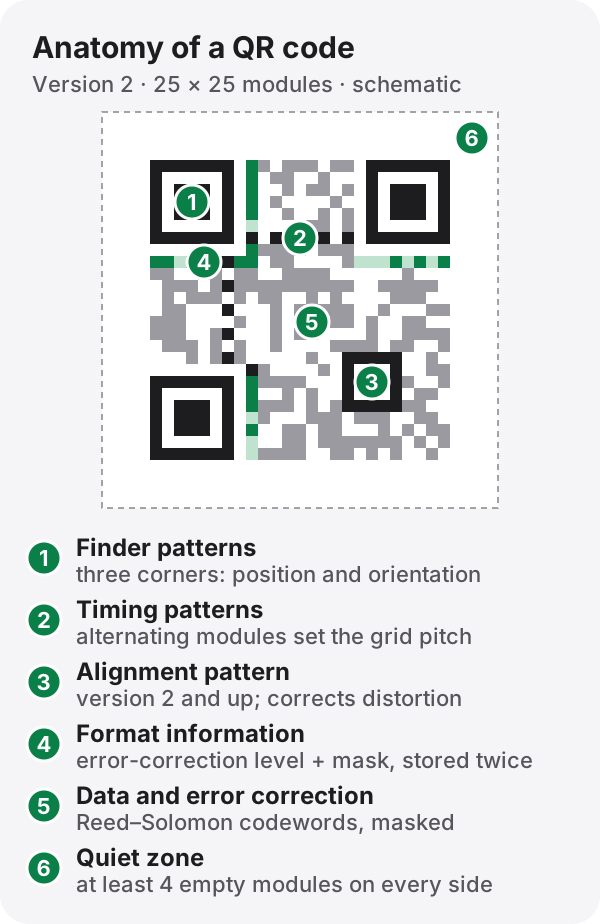
The first thing a scanner looks for
The three big squares in the corners are finder patterns. Their dark–light–dark–light–dark bands run in a 1:1:3:1:1 ratio, and a line through the center shows that ratio from any angle. So even when the camera is tilted or the code is upside down, a scanner can lock onto the three corners and work out which way is up. The missing fourth square is itself the clue to the orientation.
Between the finder patterns runs a row and a column of alternating modules, the timing patterns. They work like a ruler, telling the scanner how far apart the modules are. From version 2 up there’s also a smaller alignment pattern near the bottom-right corner, which corrects the distortion you get from a curved bottle or a screen held at an angle. The largest size, version 40, has 46 of them.
Right beside the finder patterns sits the format information: 15 bits, written twice in two places. It holds the error-correction level and the mask number, with its own error-correcting code on top. A scanner has to read it before it can make sense of anything else.
Why damage doesn’t matter (up to a point)
The rest of the grid holds the data plus Reed–Solomon error-correction codewords, the same family of codes used on CDs and in satellite links. When part of the data is missing or misread, the extra codewords let the decoder calculate the original. When you make a QR code you choose how much of that spare to include:
| Level | Recoverable (of the codewords, roughly) | Good for |
|---|---|---|
| L | 7% | Clean conditions, such as a code shown on a screen |
| M | 15% | Ordinary print; the default in many generators |
| Q | 25% | Factories, outdoors, anywhere it will get dirty |
| H | 30% | A logo in the middle, or frequent damage |
A peeling sticker survives because the torn and stained parts stay within that budget. But the budget covers only the data area. Lose one of the three finder patterns entirely, or cover both copies of the format information, and the scan fails before error correction ever gets a chance.
A logo is just damage
A QR code with a shop’s logo in the middle scans for the same reason. To the scanner the logo is a patch of broken modules, and error correction fills it in. So if you add a logo, raise the level to H and keep the logo well under 30%. Smudged ink and scratches draw on the same budget. And keep the logo off the finder patterns, the timing patterns and the format information.
Size depends on the content and the level
A QR code’s size is its version. Version 1 is 21 × 21 modules; each version adds 4 modules per side, up to 177 × 177 at version 40. The side length is 17 + 4 × version.
How much fits also depends on the characters. There are four modes:
| Mode | Characters | Density | Version 40-L max |
|---|---|---|---|
| Numeric | 0–9 | 10 bits per 3 digits | 7,089 |
| Alphanumeric | 0–9, A–Z (upper case), space, $ % * + - . / : |
11 bits per 2 characters | 4,296 |
| Byte | Any bytes (UTF-8 text included) | 8 bits per byte | 2,953 bytes |
| Kanji | Shift_JIS kanji and kana | 13 bits per character | 1,817 |
Here’s what the level does to a real address. https://motitory.com/tools/qr-code is 34 bytes. At the default M it fits in version 3 (29 × 29). Raise it to H for a logo and it needs version 4 (33 × 33). Printed at the same physical size, more modules means smaller modules, so for a poster people will scan from across a room, a shorter URL helps.
Upper-case URLs can be smaller
The alphanumeric mode has no lower-case letters. So https://motitory.com (20 bytes) goes in as bytes and needs version 2 at level M. Write it as HTTPS://MOTITORY.COM and it fits in alphanumeric mode, and in version 1 (21 × 21) exactly. That works because the scheme and domain of a URL aren’t case-sensitive. The path (/tools/…) may be, depending on the server, so leave that alone.
Masks keep the pattern readable
Dropped straight into the grid, the data could leave big dark blotches or accidentally draw something that looks like a finder pattern, which confuses scanners. So the generator tries each of 8 fixed mask patterns, flipping modules by a rule, scores each result with penalty rules and keeps the most even one. The chosen mask is recorded in the format information, and the scanner flips the modules back.
Don’t crop the margin
A QR code needs an empty quiet zone at least 4 modules wide on every side. Crop it tight to tidy a layout, or print the code over a busy photo, and the scanner can’t find where the code starts. Leave plenty of plain margin and print dark modules on a light background. Some scanners can’t read inverted codes at all.
Look at the link before you open it
Nobody can read a QR code by eye, which is exactly what makes it useful for fraud. Fake QR stickers pasted over parking meters and public notices, leading to payment pages that steal card details, have been reported in many countries. The trick even has a name, “quishing.” Be wary of a sticker that looks stuck on top of another, and after you scan, check the domain before you open the link.
Make one, then read one
The QR code generator turns a URL or text into a QR code at the error-correction level you choose, as PNG or SVG. Make the same URL at L and then at H and watch the grid grow. To see where a code leads before you open it, use the QR code scanner. Both work on your device only; your text and images are not uploaded.
The QR code was invented in Japan in 1994 by DENSO (the unit later spun off as DENSO WAVE), to track car parts. The company chose not to enforce its patent, which is a big reason it spread so widely; today it is the international standard ISO/IEC 18004. “QR Code” is a registered trademark of DENSO WAVE INCORPORATED.
References
- ISO/IEC 18004:2024, Information technology — Automatic identification and data capture techniques — QR Code bar code symbology specification
- DENSO WAVE, qrcode.com (history, error-correction levels, capacity by version)