REA (Reverse Engineer Anything): how it connects agents to analysis tools, what to learn, what to watch
What REA is and isn't, the agent-assisted investigation loop, the background worth having and a learning route, and the safety and rights boundaries, based on the project's official docs.
REA (Reverse Engineer Anything, morluto/rea) is an open-source project that lets AI coding agents use reverse-engineering tools. The project’s documentation describes it as a bridge, shipped as an MCP server and a CLI, and as a workflow for investigating binaries and apps together with an agent. The agent takes your question, calls local analysis tools through REA, and builds its answer from what they return.
This post sits outside this blog’s regular CS series: it introduces one tool that has drawn a lot of attention recently. Everything said about the project comes from the official repository and the docs at rea.tools. This post contains no benchmarks of its own and no results from running REA.
What REA is not
A name like “Reverse Engineer Anything” invites big expectations. After reading the docs, three things are worth stating plainly.
- It is not a machine that finds the truth on its own. REA returns tool output. The agent, which is a language model, interprets that output and writes the explanation, and both decompiler output and model explanations can be incomplete or wrong.
- It is not a sandbox. The project’s security policy says REA is not an isolation boundary and that malicious processes running as the same user are outside its threat model. If you handle a suspicious file, isolation is something you set up yourself, not something REA gives you.
- “Local analysis” does not mean “nobody else sees anything”. According to the docs, analysis runs on your machine and REA does not upload the target anywhere. But tool results go to your agent, and the agent sends them to its model provider. What happens to that data is governed by the data policy of the agent and model provider you use.
How an investigation runs
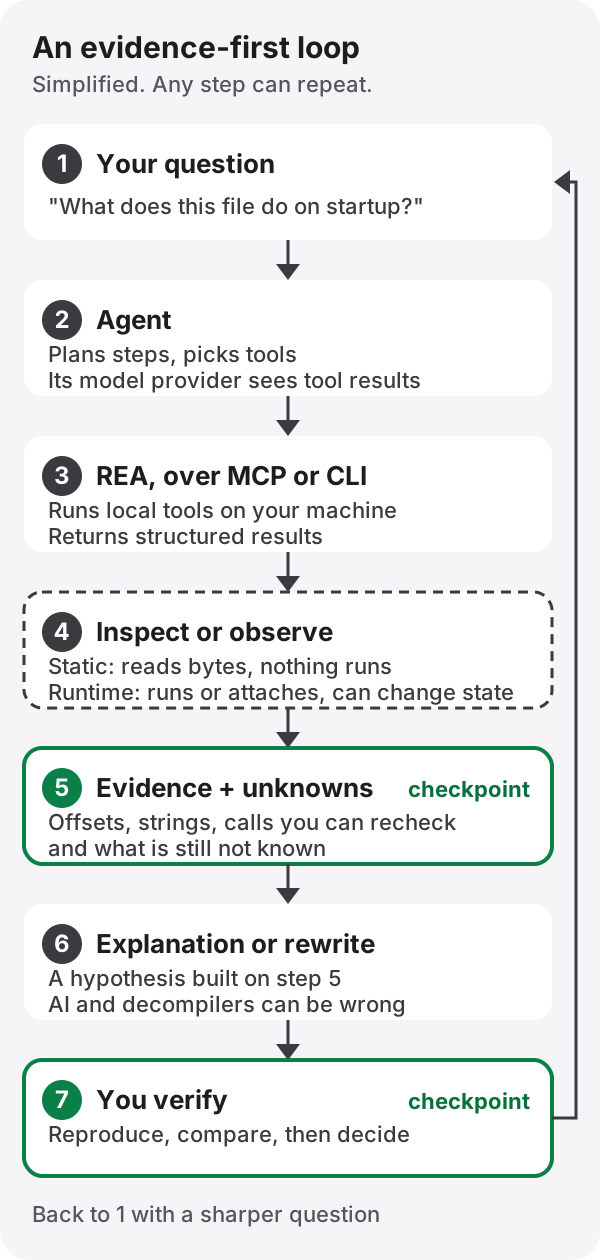
The diagram is simpler than reality. Real investigations move back and forth between steps and may call tools many times for one question. The skeleton still holds.
- Question. The more checkable the answer, the better: “Which files does this program read at startup?”
- Agent. Breaks the question into steps and chooses which tools to call.
- REA. Connected as an MCP server or called through its CLI, it runs the local analysis tools (the docs call them providers) and returns the results in a structured form. The available MCP tools and what each returns are in the MCP contracts doc, the CLI and its evidence output in the CLI doc, and how the parts fit together in the architecture diagram source.
- Inspect or observe. This is where the work splits. Static inspection only reads the file’s bytes and never runs the target. Running the target, attaching a debugger to a live process, capturing network traffic, driving a connected device, or passing debugger and provider commands through without restriction can all change the state of the target and the system around it. Do not treat the two kinds of work as equally risky.
- Evidence and unknowns. A good result carries more than a conclusion: locations you can recheck (file offsets, addresses, strings, call relationships) and the parts that are still unconfirmed.
- Explanation or reimplementation. The agent explains the behaviour from the evidence or writes similar code. This is a hypothesis.
- Human verification. You reproduce it, compare it with the original behaviour and decide whether to accept it. The doubts raised here become the next question.
REA’s part in this loop is steps 3 and 4. The rest belongs to the agent and to you, and if you skip 5 and 7 you are left with a plausible story.
What it can analyze
The targets REA says it can handle are listed in a large table in the README’s What you can analyze section. The table changes often, so instead of copying it, here is what to look for when you read it.
- Each kind of target needs different things. Targets in reverse engineering commonly fall into native executables (PE on Windows, ELF on Linux, Mach-O on macOS), managed code shipped as bytecode such as .NET or the JVM, bundled JavaScript and Electron apps, and mobile apps such as Android packages. Find the row your target belongs to first.
- Separate REA’s built-in inspection from work that relies on external tools. Some capabilities only work with external tools (providers) you install separately. Integrations with tools such as a caller-supplied objdump, GDB, Rizin and Cutter are documented separately in the reverse-engineering tools doc. Those tools are not part of REA; they are separate software with their own licences and terms.
- Check whether a capability is static or runtime. For the same target, a feature that only reads the file and one that runs or attaches to it carry different risks.
For installation, the installation doc and the official guides are the safest route. This post leaves out install commands on purpose: they can change between versions, and there may be look-alike repositories or packages. Use only the official repository, the official site and the packages they link to; if a step edits configuration files, check what will change first; and if the docs offer a dry run or a readiness check, run that before anything else.
Why now
Here is what the GitHub API returned for the repository on 14 October 2026.
| Item | Value |
|---|---|
| Repository created | 14 April 2026 |
| Stars | 217,251 |
| Forks | 53,662 |
| Latest release seen | rea-agents-6.4.0, published 11 October 2026 |
Numbers like these after six months mean a lot of people are paying attention. Nothing more. Stars and forks are not evidence that the code is correct, safe or mature, nor that it will work on your target. The figures are a snapshot from the date above and will have moved since.
The reason for the attention is easy to guess. As coding agents routinely use external tools over MCP, there is demand for handing them hard-to-learn tools like disassemblers and debuggers. That is this post’s reading, though, not a motivation the project has stated.
What helps to know before you start
You do not need to master all of this first. Knowing enough to follow what the agent is doing is enough for a first investigation, and you can fill the gaps as you go. What follows is a suggested order for widening out.
- Files are bytes. Start by reading hex dumps and recognising formats by magic numbers and headers. For executable formats, Microsoft’s PE format reference and the Linux elf(5) man page are the primary sources. Just knowing what sections, symbols and imports are makes tool output far easier to read.
- Assembly and calling conventions. You need to know which registers or stack slots carry a function’s arguments to follow a disassembly. Even on x86-64, Windows (x64 calling convention) and Linux or macOS (the System V ABI) differ. Compiling a small C function of your own and reading the result is the fastest way in.
- Static versus dynamic analysis. Learn the difference between reading without running and observing while running, and what each one misses. Opening a decompiler such as Ghidra yourself lets you compare how the agent reads the same kind of output.
- Processes, memory and debugging. Understand a process’s address space, breakpoints and single-stepping. The GDB documentation or your platform’s debugger docs are a good start.
- Platform knowledge for your target. For web and Electron apps, look at JavaScript bundles and ASAR archives; for Android, the DEX format; for .NET, the metadata and IL in ECMA-335. You do not need all three; pick the one for the target in front of you.
- MCP and tool boundaries. Read the official MCP documentation to learn what servers, tools and clients are, and where tool results go. You can only decide how much to allow the agent once you know what each tool call can change.
- Evidence, uncertainty and reproducibility. Leave the location behind every conclusion, write down what you could not confirm, and record enough that someone else gets the same result from the same input. This habit outlasts any tool.
On the REA side, the official guides and the repository’s docs/ folder are the reference.
A first exercise: a program you wrote
The best first target is a program you wrote yourself, because you hold the answer: the source code. A sample published for teaching, or a CTF challenge whose rules allow analysis, also works. Being publicly downloadable is not permission to analyze something.
Conceptually, the steps are:
- Write a small program that reads one configuration file and prints different messages depending on its value.
- Make two builds: one with debug information, and one optimized with symbols stripped.
- Without showing the source, ask the agent: “Which file does this program read, and which message does it print under which conditions?” Allow static analysis only at first.
- Check the evidence attached to the answer (addresses, strings, call relationships) and the parts it said it could not confirm against your source, one by one.
- Compare the answers for the two builds. See what blurs once the symbols are gone, and whether the agent filled those gaps without evidence.
The goal is not to get the answer right but to get a feel for when the agent’s explanation follows the evidence and when it slides into guessing.
Limits and boundaries
- Data flow. Even if REA never uploads the target, the tool results the agent receives (strings, decompiled code, captured content) go to the model provider. If the target may contain personal data or secrets, think about that first.
- State changes. Running, attaching a debugger, capturing traffic and driving a device can create or delete files, send network requests or change device settings. Do runtime work in an environment you can throw away.
- No isolation. As noted above, REA is not a sandbox, and malicious processes running as the same user are outside the security policy’s scope.
- Conclusions can be wrong. A decompiler does not recover the original code; it rewrites it into a plausible form. The model then guesses again on top of that. Verify important conclusions yourself.
- Rights and responsibility. The code REA’s authors wrote is under the MIT licence. The external tools it uses fall under the third-party notices and each tool’s own terms, and your rights over the target are a separate matter again. The project’s responsible-use disclaimer also puts the responsibility for authorization, licences, privacy and the target’s rights on the user. How a target’s terms treat reverse engineering, and what the law where you are allows, varies case by case, and this post cannot decide it for you. If you are unsure, do not analyze it, or ask someone qualified.
Recent news and what to watch
As of 14 October 2026, the latest release was rea-agents-6.4.0, published on 11 October. Its release notes list these main changes; this post has not tested them.
- Android device inspection and resource decoding
- Browsing and decompilation through a local JEB MCP server that you start yourself
- Retained Evidence summaries and selected views for large analyses
- Language, compiler and seed configuration for Ghidra imports
- Resource bounds for JavaScript source analysis; when a limit is reached, it returns the facts completed so far and states the unknowns explicitly
Changes differ from version to version, so before updating, read the release list for what changed, especially in tool contracts or configuration.
The project’s direction is in its roadmap. The priorities it names are expanding verification of native architectures, types and indirect calls; connecting static findings with runtime observations across layers; improving comparisons of obfuscated managed code and its links to native code; and extending coverage of processes, protocols, filesystems, reconnection and build comparison. A roadmap is a plan, not a promise, so check the release notes to see whether something actually shipped.
Follow-up series
Four posts go further into narrower questions. Like this one, they are based on documents and published write-ups; Motitory did not run REA for them.
- What recent write-ups actually tested: independent runs, author-claimed demos, news and opinion, sorted
- Capabilities and limits: what is possible, conditional or unsupported, and how to read Evidence
- Strengths, trade-offs and where it might go: paired pros and cons, and five conditional scenarios
- Getting started safely: a first exercise on the official fixture, a team checklist and a 30/60/90-day path
Sources
- morluto/rea repository and README (target table: What you can analyze), the official site and guides
- Repository docs: installation, CLI, MCP contracts, architecture, reverse-engineering tools, roadmap
- Security policy, responsible-use disclaimer, licence, third-party notices
- Release list, GitHub repository API
- Background: PE format, elf(5), x64 calling convention, Ghidra, GDB documentation, Electron ASAR, DEX format, ECMA-335, MCP
Links and content checked on 14 October 2026.